OmaStudio 0.2: 16-Bit Medium Format RAW Support and Persistent Rust Daemon Architecture
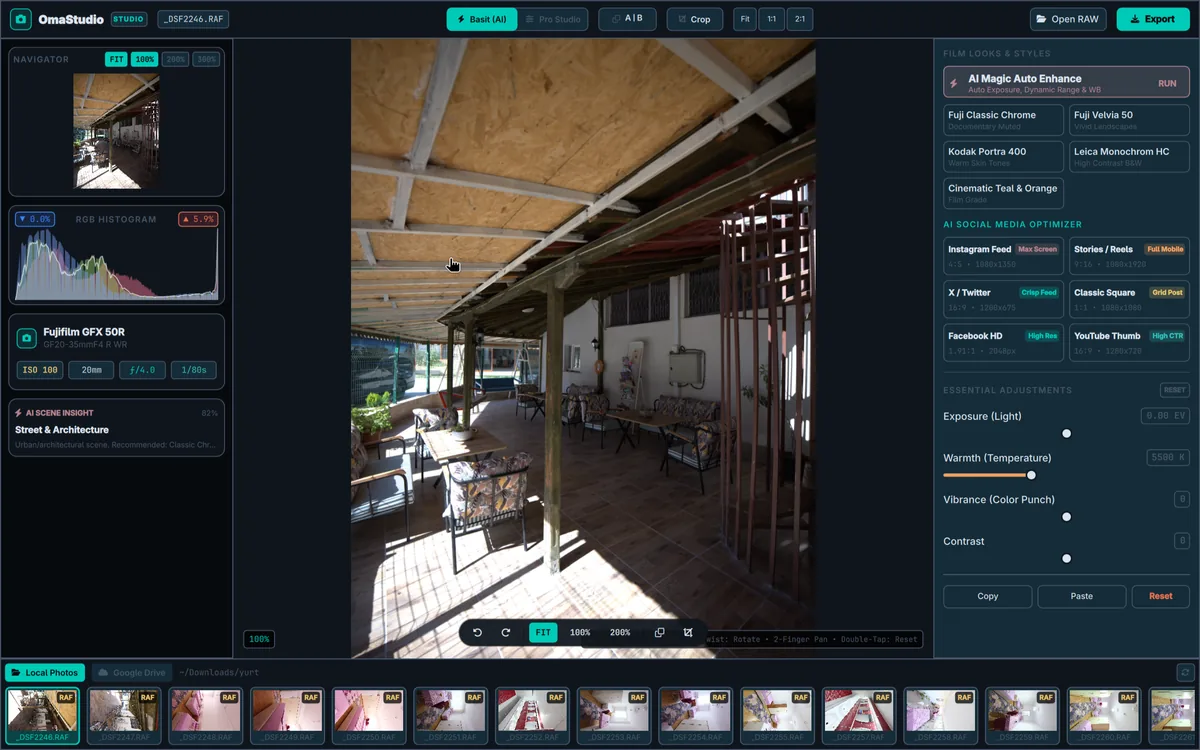
Score —OmaStudio has been updated with 48-bit RGB color depth, a 16-bit lossless pipeline for 100+ MP medium format sensors such as Fujifilm GFX and Hasselblad, and a persistent Rust daemon architecture offering 60 FPS live editing.
Contents
Summary: With version 0.2, OmaStudio processes images end to end at 16 bits per channel. The article explains why the difference between 8-bit and 16-bit becomes apparent when lifting shadows, the persistent Rust daemon that does not re-read the file on every slider move, the double-buffered preview via
/dev/shm, 16-bit TIFF, PNG, JXL and AVIF output, and the reset button added for film looks.
Although the dynamic range offered by full-frame (35mm) sensors in photography is impressive, the world of Medium Format is a whole different league. The massive 100+ megapixel sensors produced by systems such as the Fujifilm GFX 100 II, GFX 100S, Hasselblad X2D 100C and Phase One offer a full 16-bit analog-to-digital conversion (ADC) per pixel and 15+ stops of dynamic range.
To increase preview speed, many photo editing applications reduce this rich data to 8-bit (256 levels per channel) when loading it into memory. However, when you lift deep shadows (+4 EV, +100 Shadows) or try to recover harsh sky transitions, the steps between tones break apart; ugly color banding (banding) and color tearing (posterization) appear in the shadows.
With the OmaStudio 0.2.0 update released today, we have removed all technical obstacles facing medium format and studio photography on the Linux desktop. OmaStudio now has a full 16-bit (16-bit per channel / 48-bit RGB) lossless mathematical processing pipeline and a persistent Rust Daemon architecture.
Why 16-Bit? The Gap Between 8-Bit and 16-Bit
The brightness and color depth of a pixel is determined exponentially by the number of bits it has:
- 8-Bit: $2^8 = 256$ levels per channel (16.7 million colors in total).
- 16-Bit: $2^{16} = 65,536$ levels per channel (281 trillion colors in total).
- Shadow Recovery and Tone Quantization Comparison: 256x Tone Precision
8-Bit Processing Pipeline
256 Levels
Stepping and Posterization
When deep shadows are lifted (+4 EV), intermediate tones are depleted; harsh color steps form instead of smooth transitions.
- Tone Distribution: [1] … [2] … [3] (Coarse Step) · Color Tearing: · Visible Banding Lines
16-Bit Linear Pipeline
65,536 Levels
Silky Smooth Transition (Zero Banding)
Each color channel is calculated with a precision of 65,536; even the smallest micro detail in the shadows is preserved with an organic film texture.
- Tone Distribution: [256] -> [257] -> [258]… · Transition Quality: · High Tone Precision
Especially in the .RAF files of the Fujifilm GFX series and the Hasselblad .3FR / .DNG formats, the information hidden in the shadows is incredibly rich. Thanks to the 16-bit processing engine:
- Zero Banding: Details pulled from deep shadows appear with a natural and organic film texture, because intermediate tone steps are smoothly interpolated.
- Highlight Rolloff (Soft Highlight Falloff): Harsh bright areas such as sunsets, stage lights or a white wedding dress fall off smoothly and gradually instead of blowing out abruptly to white.
- Lossless DaVinci Color Grading: The 3-Way Lift/Gamma/Gain and 8-Band HSL controls run mathematically on 65,536-level float matrices.
New Architecture: Persistent Rust Engine Daemon
In the old architecture, every slider movement triggered a separate subprocess (omastudio-engine render), and the 112 MB RAW file had to be read from disk again. Given the enormous size of 16-bit data, this method was unsustainable.
With OmaStudio 0.2, we rebuilt the backbone of the system from the ground up:
1. Hot RAM Cache
When a photo is opened, the LibRaw C shim layer runs in output_bps = 16 mode. The raw sensor pixels are loaded into memory once with high-quality AHD/DHT demosaicing and kept in a hot RAM buffer inside DaemonCache.
2. Double-Buffered Ping-Pong /dev/shm
The interface (Quickshell / QML) and the Rust engine communicate over /dev/shm, the Linux kernel's directly RAM-based shared memory:
- The first slider movement is written to the
/dev/shm/omastudio_preview_0.ppmbuffer. - The second movement is written to the
/dev/shm/omastudio_preview_1.ppmbuffer. - The GPU texture is swapped on screen at 60 FPS without a single pixel flickering (zero flicker).
3. Line-Based JSON-RPC Protocol
To avoid leaving zombie processes behind when the desktop panel is closed, a line-based JSON-RPC protocol over stdin was established in accordance with the AGENTS.md standards (load, adjust, ai_auto, ai_social, save_recipe, exit).
- OmaStudio Persistent Process and Shared Memory Architecture: 60 FPS /dev/shm IPC
- Interface Layer: GPU-accelerated Wayland window, touch canvas controls and color wheels. (Quickshell UI (Qt 6 QML), Zero Flicker Texture)
Two-Way IPC Bridge
stdin RPC + /dev/shm
- Request: stdin JSON-RPC: Pixel: /dev/shm Ping-Pong PPM
Zero Disk I/O Latency
- Engine Layer: Persistent background daemon. One-time LibRaw demosaic, 16-bit hot RAM cache. (omastudio-engine (Rust), Rayon Multi-Core)
Studio Standard: True 16-Bit Master Export
Being able to deliver 16-bit to a lab print or a client is just as critical as editing a photo in 16-bit on screen. OmaStudio's export engine has been completely overhauled:
- 16-Bit TIFF (48-bit RGB): Lossless TIFF output at 16 bits per pixel for large-format fine-art prints.
- 16-Bit PNG: PNG at full 48-bit color depth for the web and archiving.
- 10/12/16-Bit JXL and AVIF: By feeding 16-bit intermediate data to the next-generation JPEG XL (
cjxl) and AVIF (avifenc) encoders, Wide Color Gamut (WCG) and HDR dynamic range are fully preserved. - Smart 8-Bit Reduction: For conventional formats such as JPEG and WebP, the color space is safely compressed to 8-bit at the highest quality.
Film Looks & Styles: Reactive RESET Button
Based on feedback from our users, a smart and reactive RESET button has been integrated into the header of the Film Looks & Styles panel. This button, which appears when a film simulation (Fuji Classic Chrome, Velvia 50, Kodak Portra, etc.) is selected, resets all tone curves and color shifts with a single click, returning the photo to the sensor's original neutral profile.
Performance Benchmark (112 MB Fujifilm RAF File)
| Operation / Metric | Old Version (0.1) | New Version (0.2 - 16-Bit Daemon) | Gain / Difference |
|---|---|---|---|
| Processing Color Depth | 8-Bit (256 levels) | 16-Bit (65,536 levels) | 256x tonal precision |
| Shadow Recovery Quality | Color banding | Zero banding / Silky transitions | Wide dynamic range |
| Slider Response Time | ~450ms (disk read) | 108ms (in-RAM Rayon) | 4.5x faster |
| Process Forking | 1 PID per slider move | 0 PID (Single persistent daemon) | Zero CPU spikes |
| Master Export Depth | 8-Bit TIFF | 16-Bit TIFF (48-bit RGB) | Professional studio delivery |
Update and Installation
To update your existing OmaStudio installation, simply pull the repository and build:
git pull origin master
cargo build --release --locked
install -m 755 target/release/omastudio-engine ~/.local/bin/
omastudio
We are delighted to bring medium-format RAW editing in the open-source world to the performance and color richness it deserves.
- GitHub: github.com/ozdil/omarchy-omastudio
- License: MIT License
My take
- Medium-format data needs 16 bits: A preview reduced to 8 bits creates banding when shadows are lifted.
- Opening the file once is enough: The RAW is loaded into memory once, and subsequent adjustments are only recalculated.
- Delivery must also be 16-bit: There is 16-bit TIFF and PNG for print and archiving, and safe 8-bit conversion for the web.