NetRadar for Omarchy Linux: A Fast, Unprivileged Local Network Scanner and Device Radar
Score —The release of the NetRadar plugin, powered by Quickshell and a Rust core, which maps the local network in seconds without requiring root privileges, using the Linux kernel's unprivileged interfaces and POSIX getnameinfo.
Contents
Summary: NetRadar is an Omarchy plugin that discovers devices on the local network without requiring root privileges. The article explains how discovery is done using the kernel's neighbor table, mDNS triggering and getnameinfo, vendor detection from the MAC prefix, ping and service probing, security measures, and its use both as a top bar widget and as a desktop application.
In modern home and office networks, dozens of smart devices, phones, tablets, televisions, single-board computers and IoT equipment are connected and running at the same time. Yet for most Linux users, finding an answer to the question "Which devices are currently on my local network, where is my gateway, and which hardware vendors do these devices belong to?" is usually a laborious process.
Traditionally, this need is met by opening a terminal and resorting to heavy CLI tools such as sudo nmap -sn 192.168.1.0/24 or similar tools that create raw sockets, require CAP_NET_RAW and push system privileges. In the desktop environment, there was a felt lack of a lightweight, secure and elegant solution that instantly presents network status, the number of connected devices, IP/MAC mappings and hardware vendors from the top panel (bar widget) with a single click.
To meet this need, I am pleased to announce the NetRadar project, which we designed for the Omarchy Linux desktop ecosystem.
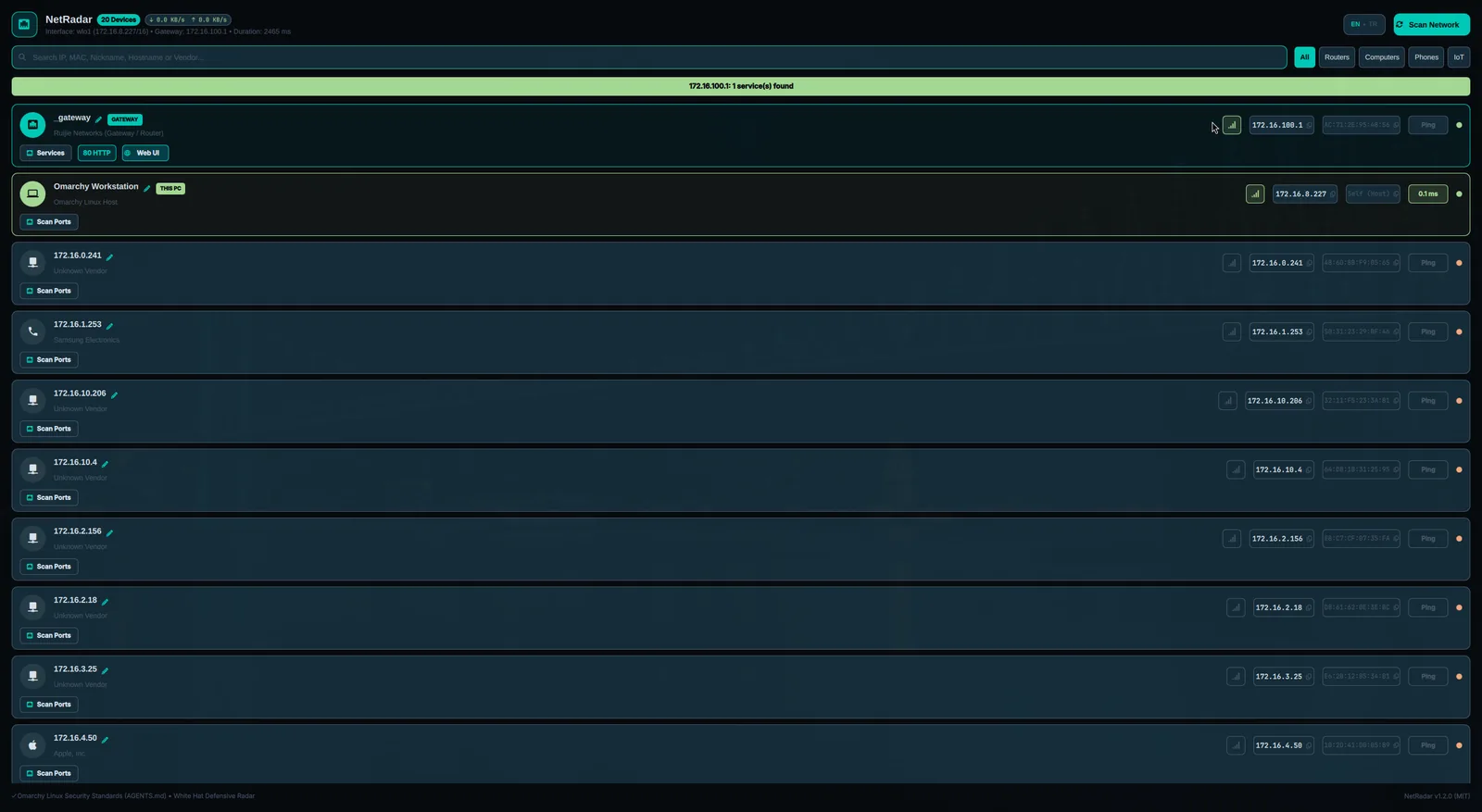
NetRadar is a modern desktop radar that makes your local network visible with a single click, thanks to its smooth Wayland interface built on Quickshell 4.0, its high-performance Rust-based engine (netradar-engine), its zero root/unprivileged operating principle and its built-in IEEE OUI hardware vendor detection database.
1. Unprivileged (Rootless) Discovery Architecture
For a network scanner to run safely in a desktop environment, the most fundamental rule is that it must not require any privilege escalation (sudo, pkexec, setuid or CAP_NET_RAW).
NetRadar makes maximum use of the kernel's unprivileged user-space interfaces:
- Kernel Neighbor Table (
ip -j neigh&/proc/net/arp): The ARP and neighbor records that the Linux kernel resolves over network interfaces are parsed in JSON format. - Harmless mDNS / UDP Triggering: To keep devices on the network up to date in the neighbor table, unprivileged UDP packets are sent to standard local multicast ports (5353 mDNS / 137 NetBIOS) to trigger the kernel's ARP resolution.
- Safe Reverse DNS with POSIX getnameinfo: Device hostnames are resolved within seconds by scanning at the libc level with
getnameinfoand the local/etc/hostscache.
2. Built-in IEEE OUI Vendor Detection
Listing devices on the network only by their cryptic IP (192.168.1.42) or MAC (AC:71:2E:...) addresses is insufficient in terms of user experience.
NetRadar hosts a high-speed OUI (Organizationally Unique Identifier) prefix table embedded in the engine:
- By instantly matching the first 3 bytes of the MAC address, it detects the device's vendor (Apple, Samsung, Intel, Google, Xiaomi, Huawei, Amazon, Raspberry Pi, Espressif IoT, TP-Link, MikroTik, Cisco, VMware, etc.).
- It automatically categorizes the hardware type: Router, PC, Phone, Internet of Things (IoT) or Smart TV.
- It assigns category-specific visual icons and color highlights on the interface.
3. White Hat Service Probing and Quick Access
NetRadar is not only a passive observer; it also offers practical features that make local network management easier:
- Live Latency (Ping) Probes: The millisecond round-trip time (RTT) is measured for each device, and reachability status is presented with green/orange indicators.
- Management Service Check: The devices' standard management ports (80 HTTP, 443 HTTPS, 8080 WebUI, 22 SSH, 53 DNS, 445 SMB) are probed with non-intrusive TCP handshakes with a short 130-millisecond timeout.
- One-Click Web Interface Opening: Opens the web management panel for your router or modem directly in your default browser.
- One-Click SSH Launch: Starts an SSH session directly through the
footterminal to devices such as servers or Raspberry Pis where an open port is detected. - Wayland Clipboard Integration: The moment an IP or MAC address is clicked, it is copied to the clipboard with
wl-copyand an instant notification is shown on screen.
4. Compliance with Security and Defense Standards
NetRadar has been developed in accordance with Omarchy Linux's security principles:
- Subprocess Isolation: All external system commands are run in an independent process group via
cmd.process_group(0), with sanitized environment variables (PATH=/usr/bin:/bin,LC_ALL=C) andO_NONBLOCKpipe reads. - Bounded Buffer and Memory Ceiling: Process pipe reads are limited to a 64 KiB ceiling (
MAX_BUFFER_CAP = 64 * 1024), while persistent state files are limited to a 1 MiB ceiling (MAX_REGISTRY_FILE_SIZE = 1024 * 1024). Memory consumption and DoS attacks are prevented. - Argument Injection Defense: IP addresses are strictly validated through
Ipv4Addr. The--argument terminator, which prevents flag manipulation, is passed to thepingandsshcommands. - Private Subnet Bounding (CIDR Bounding): Scanning and port probing operations are strictly limited to RFC 1918 (
10.0.0.0/8,172.16.0.0/12,192.168.0.0/16), RFC 3927 (link-local) and loopback addresses. Sending packets to public internet addresses is prevented. - Mode 0600 Atomic Storage: Device aliases and the trusted device list are saved atomically via
.tmp_*in0700-permission directories and0600-permission files, where symbolic links (symlinks) are strictly rejected. - XSS and Markup Protection: All dynamic text in the Quickshell/QML interface is processed with the
textFormat: Text.PlainTextdeclaration.
5. Dual-Mode Usage
NetRadar is optimized for two different usage scenarios:
- Quickshell Top Bar Widget (
Panel.qml): A counter badge showing the number of active devices in the top-right bar of the desktop, and a quick radar menu that opens when clicked. - Desktop Application (
netradar-dashboard,shell.qml): A wide control panel with category filter chips (All, Routers, Computers, Phones, IoT), a search bar, and live network traffic (RX/TX rates) indicators.
6. Installation and Usage
Building from Source
# Depoyu klonlayın
git clone https://github.com/ozdil/omarchy-netradar.git
cd omarchy-netradar

# Motoru derleyin
cargo build --release --locked

# İkili dosyaları kurun
install -Dm755 target/release/netradar-engine ~/.local/bin/netradar-engine
install -Dm755 netradar ~/.local/bin/netradar
install -Dm755 netradar-dashboard ~/.local/bin/netradar-dashboard
install -Dm755 netradar-status ~/.local/bin/netradar-status
install -Dm644 netradar.desktop ~/.local/share/applications/netradar.desktop
CLI Usage
# Tam JSON tarama çıktısı (otomasyon ve betikler için)
netradar-engine --scan

# Tek satır insan okunabilir durum özeti
netradar-status

# Belirli bir cihazın gecikmesini ölçme
netradar-engine --ping 192.168.1.1

# Bir cihaza kalıcı takma ad (alias) atama
netradar-engine --set-alias "AC:71:2E:95:48:56" "Ana Ofis Router"

# Grafiksel kontrol panelini başlatma
netradar
My reading
- No root needed for network scanning: the neighbor records the kernel already keeps are enough for most needs.
- Scanning is limited to private networks only: it does not go beyond RFC 1918 and link-local.
- Inputs are passed to commands safely: IP validation and the
--terminator prevent argument injection.
Resources
- GitHub Repository: ozdil/omarchy-netradar
- License: MIT License
- Developer: Ozan Özdil